Introduction
On a recent project I was building a binary classification model to try to identify competitor products that were similar to our own. This was ultimately towards ensuring the pricing for our products was optimised within the market. In the world of Asset Management it can be difficult to compare like-for-like investment solutions across different asset managers and there is no database that exists that will tell me that, for example, our European market neutral strategy is really the same as a competitors' similarly named strategy and so a machine learning approach was required.
I apprached the binary classification model in a standard way using a range of numerical and categorical variables as features however I wasn't having a great deal of success. After discussing with colleagues it was suggested to me that there was a feature of the objects I was working with that may contain a useful encoding of the binary class that I was ultimatly trying to predict.
The challenge was that the feature was a non-categorical natural language collection of words and therefore not a common feature variable type used in modelling. I was attracted to the idea however of distilling the problem to 'simply' using one natural language feature to predict a binary outcome variable. I.e. the data set could be reduced to something like Table 1 below:
| Feature | Target |
|---|---|
| Word1 Word2 Word3 | 1 |
| Word4 Word5 Word6 Word7 | 0 |
| Word8 Word9 | 1 |
| Word11 | 0 |
| ... | ... |
I had been reading about Google's BERT model, a (massive) pretrained neural network that was achieving state of the art results on many NLP problems and wondered if this tool could help in my case.
BERT is a type of transfer learning model that processes natural language and passes along some information it has extracted from it as an output that can then be transfered as an input into an additional classification model.
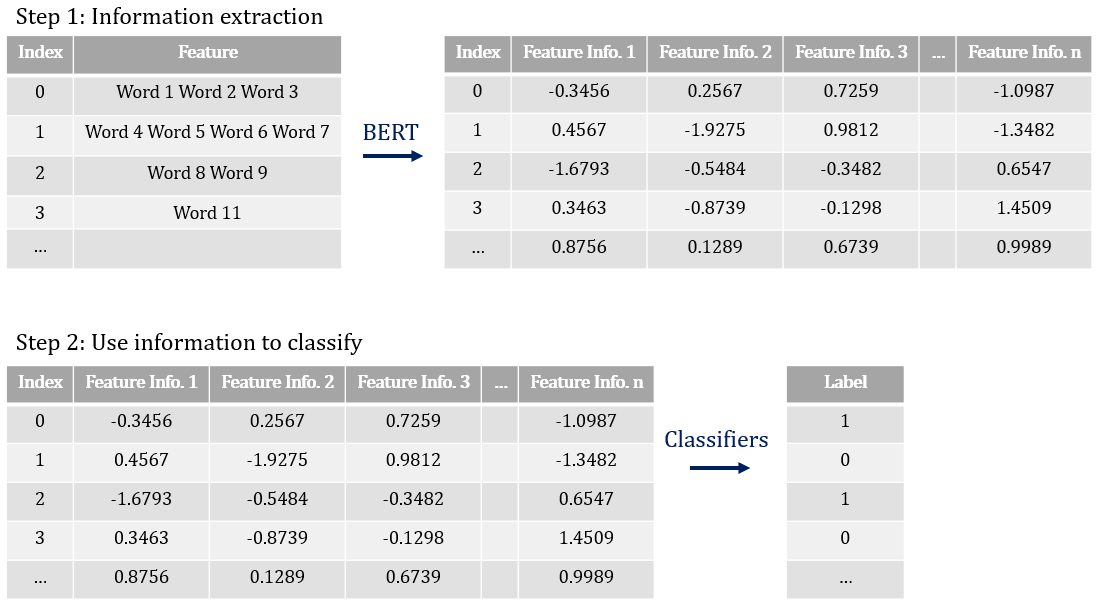
In my case, after getting the BERT model processing my data set I built and compared logistic regression, random forest, gradient boosted (xgboost) and neural network models as the final classification layer.
This post describes Step 1 above, namely how to get the BERT model running on your machine and extracting information from natural language
Part 2 in this series then describes the binary classifiers I used.
To preserve confidentiality the below code illustrates this approach on a popular movie review sentiment analysis data set that is structurally the same as Table 1 and still accurately illustrates the process above.
Implementing in Python
Link to my GitHub repo: NLP-with-BERT
Step 1: Extract information with BERT
The key python module used here is transformersImport modules and load data . I have included a copy of the data in my GitHub repo which the below refers to; this was originally located at the following repository: https://github.com/AcademiaSinicaNLPLab/sentiment_dataset/blob/master/data/stsa.binary.train
	#############################################################
	# Title: Binary Classification with BERT and some Classifiers
	# Author: Thomas Handscomb
	#############################################################

	# Import libraries
	import matplotlib.pyplot as plt

	import numpy as np
	import pandas as pd

	import torch
	import transformers
	import tensorflow
	import keras

	from sklearn.model_selection import train_test_split
	from sklearn.linear_model import LogisticRegression
	from sklearn.model_selection import GridSearchCV
	from sklearn.model_selection import cross_val_score
	from sklearn.preprocessing import OneHotEncoder

	from keras.models import Sequential
	from keras.layers import Dense

	#~~~~~~~~~~~~~~~~~~~~~~~~~~~~~~~~~~~~~~~~~~~~~~~~~~
	## Helpful control of display option in the Console
	#~~~~~~~~~~~~~~~~~~~~~~~~~~~~~~~~~~~~~~~~~~~~~~~~~~

	# Control the number of columns displayed in the console output
	pd.set_option('display.max_columns', 20)
	# Control the width of columns displayed in the console output
	pd.set_option('display.width', 1000)

	#########################
	# STEP 1: Load BERT model
	#########################

	#~~~~~~~~~~~~~~~~~~~~~~~~~
	## Bring in data and clean
	#~~~~~~~~~~~~~~~~~~~~~~~~~

	df_Sentiment_Train_Full = \
	pd.read_csv("https://github.com/ThomasHandscomb/NLP-with-BERT/raw/master/train.csv"
                                 , encoding = "ISO-8859-1")
	# Rename column headings
	colnamelist = ['Text', 'Label']
	df_Sentiment_Train_Full.columns = colnamelist

	# Take a random sample of the data frame to speed up processing in this example
	frac = 0.10
	df_Sentiment_Train = \
	df_Sentiment_Train_Full.sample(frac=frac, replace=False, random_state=1)

	df_Sentiment_Train.reset_index(drop=True, inplace = True)
Prepare data set for loading into BERT. First we define which NLP model and pre-trained weights to use. In this example I use the light-weight version of
the full BERT model, called DistilBert, to speed up run time however the process is exactly the same on the full BERT model by replacing DistilBERT with BERT
	NLP_model_class = transformers.DistilBertModel
	NLP_tokenizer_class = transformers.DistilBertTokenizer
	NLP_pretrained_weights = 'distilbert-base-uncased'

	# Load pretrained tokenizer and model
	NLP_tokenizer = NLP_tokenizer_class.from_pretrained(NLP_pretrained_weights)
	NLP_model = NLP_model_class.from_pretrained(NLP_pretrained_weights)
Tokenise the string names. This converts each word in the text into an integer corresponding to that word in the
BERT dictionary. The tokeniser also adds endpoint tokens of 101 at the start of the word and 102 at the end. An illustration of this process is below:
	example_text = pd.Series(['A B C Hello'])
	example_tokenized_text = \
	example_text.apply((lambda x: NLP_tokenizer.encode(x, add_special_tokens=True)))
	example_tokenized_text

	Out[20]:
	0    [101, 1037, 1038, 1039, 7592, 102]
	dtype: object
Tokenise the real data
	tokenized_text = \
	df_Sentiment_Train['Text'].apply((lambda x: NLP_tokenizer.encode(x, add_special_tokens=True)))
The input data for the BERT model needs to be uniform in width, i.e. all entries need
to have the same length. To achieve this we pad the data set with 0's from the width
of each tokenized_text value to the maximum tokenised length in the series
	# Determine the maximum length of the tokenized_text values
	max_length = max([len(i) for i in tokenized_text.values])

	# Create an array with each tokenised entry padded by 0's to the max length
	padded_tokenized_text_array = \
	np.array([i + [0]*(max_length-len(i)) for i in tokenized_text.values])
	padded_tokenized_text_array.shape

	Out[27]: (692, 64)
Define an array specifying the padded values - we use this later to distinguish the real data from
the padded [0] data
	padding_array = np.where(padded_tokenized_text_array != 0, 1, 0)
	#padding_array.shape
The BERT model expects a PyTorch tensor as input so convert the padded_tokenized_text and padding arrays to PyTorch tensors (Note need to specify dtype = int)
	padded_tokenized_text_tensor = torch.tensor(padded_tokenized_text_array, dtype = int)
	padding_tensor = torch.tensor(padding_array)
We can view the evolution of a row of data from original text through to padded, tokenised tensor
	df_Sentiment_Train.loc[[0]] # Original data
	Out[29]:
		Text  						Label
	0  peppered with witty dialogue and inventive mom...      1

	tokenized_text[0] # Initial tokenised series
	Out[30]: [101, 11565, 2098, 2007, 25591, 7982, 1998, 1999, 15338, 3512, 5312, 102]

	padded_tokenized_text_array[0] # Padded tokenised array
	Out[31]:
	array([  101, 11565,  2098,  2007, 25591,  7982,  1998,  1999, 15338,
			3512,  5312,   102,     0,     0,     0,     0,     0,     0,
			   0,     0,     0,     0,     0,     0,     0,     0,     0,
			   0,     0,     0,     0,     0,     0,     0,     0,     0,
			   0,     0,     0,     0,     0,     0,     0,     0,     0,
			   0,     0,     0,     0,     0,     0,     0,     0,     0,
			   0,     0,     0,     0,     0,     0,     0,     0,     0,
			   0])

	padded_tokenized_text_tensor[0] # Padded tokenised tensor
	Out[32]:
	tensor([  101, 11565,  2098,  2007, 25591,  7982,  1998,  1999, 15338,  3512,
			 5312,   102,     0,     0,     0,     0,     0,     0,     0,     0,
				0,     0,     0,     0,     0,     0,     0,     0,     0,     0,
				0,     0,     0,     0,     0,     0,     0,     0,     0,     0,
				0,     0,     0,     0,     0,     0,     0,     0,     0,     0,
				0,     0,     0,     0,     0,     0,     0,     0,     0,     0,
				0,     0,     0,     0])
Pass the processed torch tensor through the BERT model . This can take some processing time
	# Ensure the pytorch gradients are set to zero - by default these accumulate
	with torch.no_grad():
		DistilBERT_Output = NLP_model(padded_tokenized_text_tensor
		, attention_mask = padding_tensor)
The full details take some unpacking here and are largely beyond the scope of this blog post however the DistilBERT_Output object is a 1-tuple whose single
entry is a 3-dimensional tensor with
	print(type(DistilBERT_Output[0]))
	print(padded_tokenized_text_tensor.shape)
	print(DistilBERT_Output[0].shape)

	<class 'torch.Tensor'>
	torch.Size([692, 64])
	torch.Size([692, 64, 768])
The width corresponds to tokens and the 768 depth layers correspond to hidden states for each text and come from the construction of the massive neural network that
comprises the BERT model - this is the number of nodes in the output layer of the network. The authors of BERT have specified the hidden state vector corresponding to the first token as an aggregate representation of the whole sentence used for classification tasks. That is, for each row of text the vector of length 768 corresponding to the [0]th width token of the BERT output is the output that should be used as input into a final classifier model.
We can efficiently slice the [0]th width token for all rows of the DistilBERT output as follows. These form the feature variable dataframe for final clasification
	features_df = pd.DataFrame(np.array(DistilBERT_Output[0][:,0,:]))
	features_df.shape
Out[47]: (692, 768)
The target label dataframe is constructed from the original data set
	labels_df = df_Sentiment_Train[['Label']]
	labels_df.shape
Out[48]: (692, 1)
Having used the BERT pre-trainined model to extract some information from our natural language features we are now in a position to build classifier models to predict the binary
target classes. This is covered in more detail in Part 2 of this series.