Introduction
Like most professionals in financial services I subscribe to a range of market news and commentary emails. These are written by journalists, investment professionals and market commentators and provide daily perspectives on economics, geopolitics, social and behavioural sciences, etc. and the effect these are having, or being hypothesised to have, on market dynamics.
I realised there was a potentially very interesting and useful time series of data on current market topics and sentiment being built in my inbox from these emails. My corporate email was traditionally not a data set that I was used to querying and my first challenge was to get hold of this data (or at least metadata) in a way that allowed me to do some interesting things with it.
The NLP on this data set is a topic for another post, however throughout the process of curating a pandas dataframe containing elements of this market email data I became curious as to what my Inbox looked like more broadly. In particular what my Received and Sent emails could tell me about my office environment, main collaborators and my own working style from a behavioural standpoint. This post describes the Python code I used to scrape metadata from my Inbox and some learnings I obtained.
Implementing in Python
Link to my GitHub repo: Email-Scraping
The first thing to do was to navigate to my email folder structure and pull something out. The pywin32 module was ideal in this case.
	###########################################################
	# Title: Querying emails
	# Purpose: Extract metadata from outlook emails with Python
	# Author: Thomas Handscomb
	###########################################################

	# import modules into session
	import pandas as pd
	import win32com.client
	from tqdm import tqdm # Useful module for displaying a progress bar during long loops

	# Define Outlook location
	outlook = win32com.client.Dispatch("Outlook.application")
	mapi = outlook.GetNamespace("MAPI")

	# Find the folder number of the 'Thomas.Handscomb@[CompanyName].com' meta
	# data folder to start with
	for k in range(1, len(mapi.Folders)+1):
		try:
			fol = mapi.Folders.Item(k)
			if fol.name == 'Thomas.Handscomb@[CompanyName].com':
				folnum = k
				#print(folnum)
				break

		except Exception as e:
			print('Error:' + '(' + str(k) + ')')
			pass

	print(folnum)
	1
Once you have determined the above folder number, find the 'Inbox' and 'Sent Items' folders within this
	Inboxnum, Sentnum = -1, -1

	for l in range(1,30):
		try:
			subfol = mapi.Folders.Item(folnum).Folders.Item(l)

			if Inboxnum > 0 and Sentnum > 0:
				break
			elif subfol.name =='Inbox':
				Inboxnum = l
			elif subfol.name =='Sent Items':
				Sentnum = l

		except Exception as e:
			print('Error at loop: %.f' %l)
			pass

	print("%0.f, %0.f" %(Inboxnum, Sentnum))
	2, 4
Once the folder numbers are defined, use these to specify the 'Inbox' and 'Sent' folders
	Inbox = mapi.Folders.Item(folnum).Folders.Item(Inboxnum)
	Sent = mapi.Folders.Item(folnum).Folders.Item(Sentnum)

	# Double check the name
	if Inbox.name == 'Inbox' and Sent.name == 'Sent Items':
		print('Inbox and Sent folders assigned correctly')
		pass
	else:
		print('An error has occured')

	'Inbox and Sent folders assigned correctly'
Now that the Inbox and Sent Items folders have been correctly identified the below loop constructs a dataframe by looping through all items
(i.e. emails) in the Inbox and extracting some metadata from them, namely the date received, the sender and the subject.
	# Now that the Inbox and Sent Items folders have been determined,
	# create a blank data frame to store email metadata, in this case (date/time sent,
	# sender name, email subject)
	Inbox_col_names =  ['Full Date', 'Date', 'Hour', 'Sender', 'Subject']
	Inbox_df = pd.DataFrame(columns = Inbox_col_names)

	# Loop through all Inbox.Items (i.e. emails)
	# the tqdm wrapper puts a progress bar on the loop
	for message in tqdm(Inbox.Items):
		try:
			Inbox_df.loc[len(Inbox_df)] = \\
			[message.LastModificationTime.strftime("%Y-%m-%d %H:%M:%S")
			, message.LastModificationTime.strftime("%Y-%m-%d")
			, message.LastModificationTime.strftime("%H")
			, message.Sender
			, message.Subject]
		except:
			pass

	# Confirm you are picking up all emails
	Inbox_df.groupby(['Date']).size()

	# Output data frame to review
	Output_filepath = 'C:/Users'

	Inbox_df.to_csv(Output_filepath+'/Inbox.csv'
				   , encoding = 'utf-8'
				   #, mode = 'a'
				   , index = False
				   , header = True)
and similarly for my Sent Items
	Outbox_col_names =  ['Full Date', 'Date', 'Hour', 'Recipient', 'Subject']
	Outbox_df = pd.DataFrame(columns = Outbox_col_names)

	for message in tqdm(Sent.Items):
		try:
			Outbox_df.loc[len(Outbox_df)] = \\
			[message.LastModificationTime.strftime("%Y-%m-%d %H:%M:%S")
			, message.LastModificationTime.strftime("%Y-%m-%d")
			, message.LastModificationTime.strftime("%H")
			, message.To
			, message.Subject]
		except:
			pass

		Outbox_df.to_csv(Output_filepath+'/Outbox.csv'
				   , encoding = 'utf-8'
				   #, mode = 'a'
				   , index = False
				   , header = True)
Organisational Working Patterns
The final steps above output two csv files, Inbox_df and Outbox_df, summarising the email datestamp, sender/receiver and subject.
Starting with my inbox the below shows the aggregated distribution of the hours of the day when colleagues send me emails
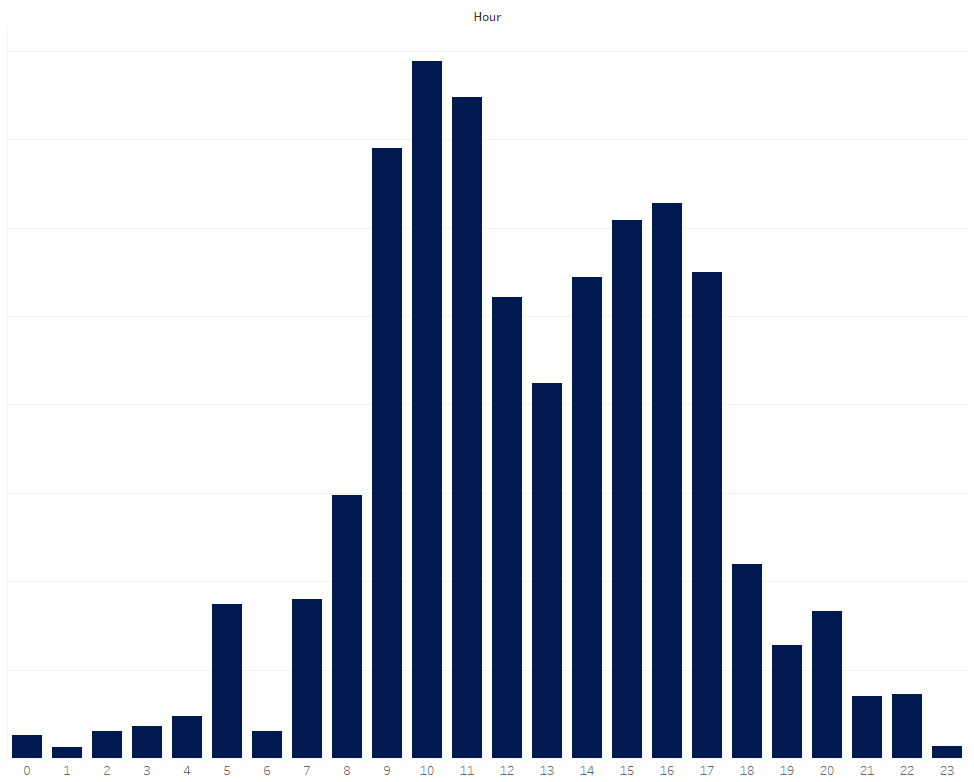 This picture is broadly unsurprising: colleagues tend to come into the office and work through their inboxes first thing. Energised
after a lunchtime lull at mid day, colleagues ramp up communication again from 2:00pm before a tail off to the end of the day.
A few dedicated individuals continue late into the evening and some from overseas offices continue overnight.
This picture is broadly unsurprising: colleagues tend to come into the office and work through their inboxes first thing. Energised
after a lunchtime lull at mid day, colleagues ramp up communication again from 2:00pm before a tail off to the end of the day.
A few dedicated individuals continue late into the evening and some from overseas offices continue overnight.
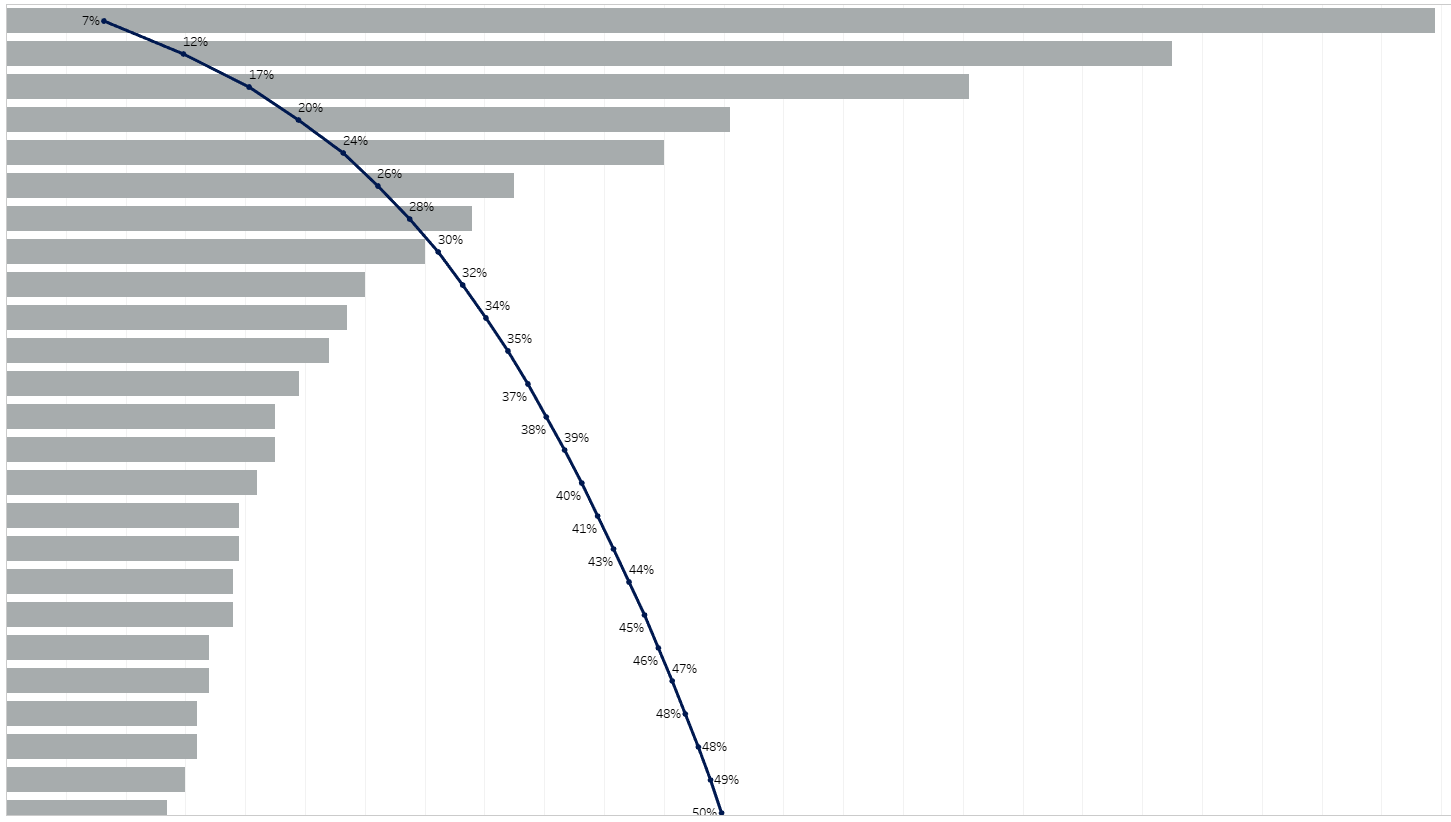
Sorting by sender illustrated clearly to me who my closest collaborators were (as well as those who spam me the most!) Each row in the below is a unique sender. The overlaid pareto curve illustrating the cummulative proportion of these. 4 colleagues send me 20% of all emails I receive!
Learnings
What was more interesting to me was how I was responding to emails. Below is the distribution of my sent emails by sent hour of the day:
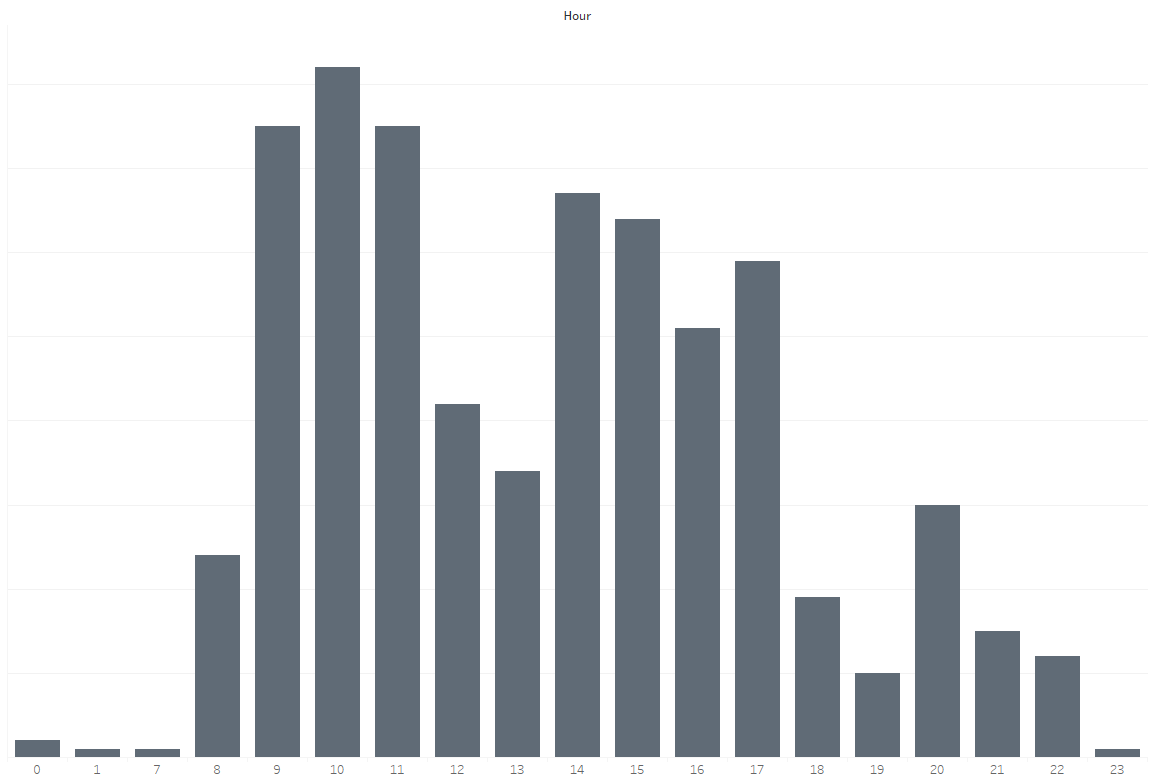
I generally followed the same pattern as the broader firm, perhaps a less pronounced spike at 10:00am, and a more pronouced one at 8:00pm when I logged on again from home. The real insight for me was just how many emails I was sending in the morning, typically my most creative and productive time of the day for doing data science.
Why was I sending so many emails during my most creative time?Doing so was taking up valuable time to write and distrupting my ongoing concentration on doing or guiding on some difficult piece of data science. Worse still, almost none of these emails needed a response in this time. Having reflected on this I began blocking 'non emailing sending' time in my diary in the mornings to ensure I was most efficient in executing on a difficult piece of work.